
3D Product Configurator: A Practical Guide for E-commerce Brands
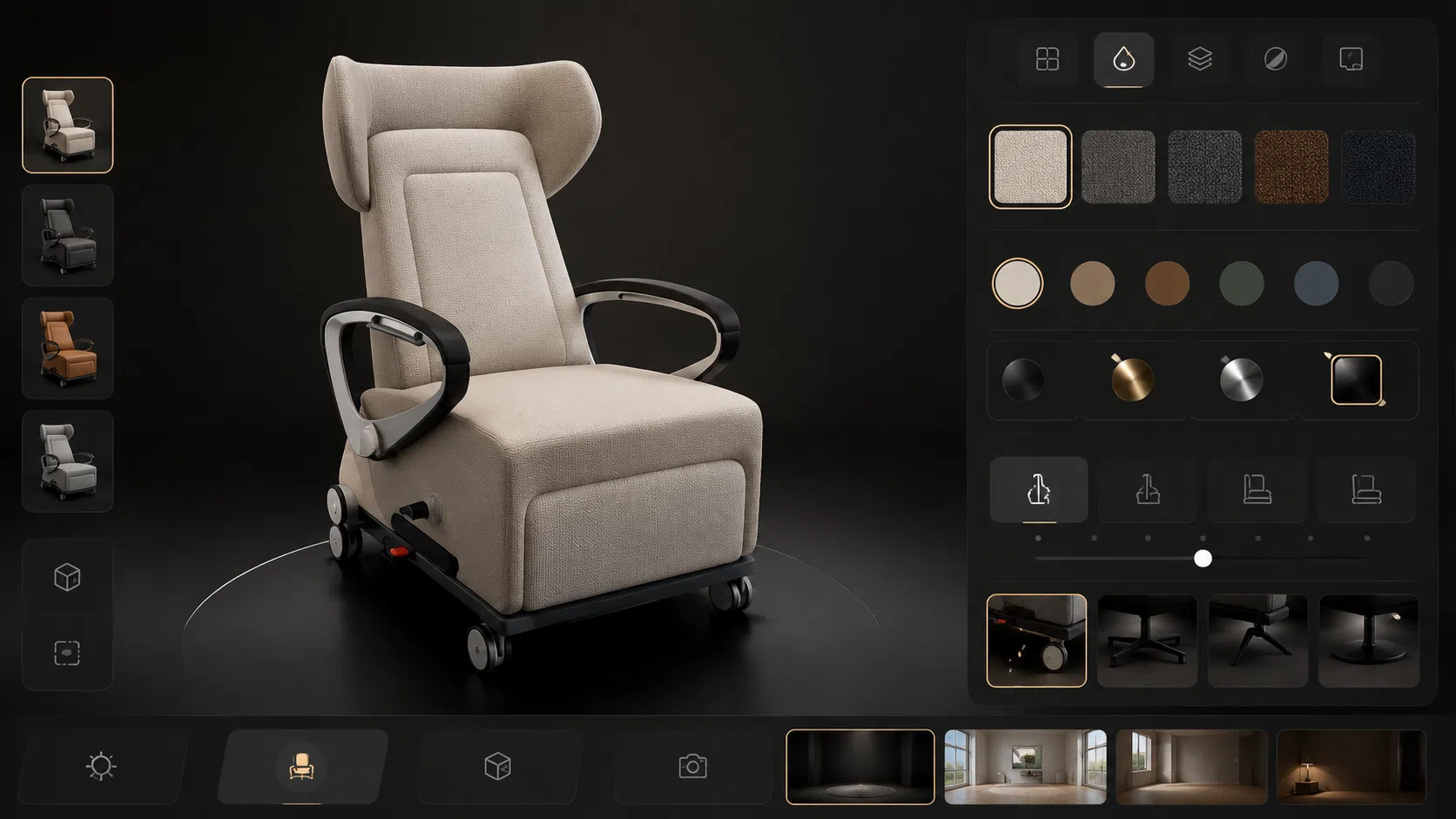
A 3D product configurator is an interactive online tool that lets a customer customize a product and see the changes in real time. The shopper can rotate the product, zoom in, change colors, switch materials, swap components, choose finishes, or preview the item in augmented reality. Each change updates the visible 3D model on the screen.
For e-commerce brands
Bridging the Buyer Uncertainty Gap
Online shoppers no longer rely on a few flat product photos to make a buying decision. When a product has many colors, materials, sizes, finishes, or modular parts, static images leave the buyer guessing. A 3D product configurator solves this gap by letting customers rotate the product, change colors, swap materials, and preview the item in their own space before they check out.
A 3D product configurator is only as useful as the 3D assets behind it. The product model, materials, textures, file formats, variation rules, and AR-ready outputs all decide how realistic and trustworthy the experience feels. Brands that want a configurator usually need a clear plan for 3D modeling, material setup, optimization, and visual content.
If you are also planning catalog images, ads, or launch visuals, our 3D product rendering services cover the same asset pipeline that supports configurators, 360 views, and AR experiences.
This guide explains what a 3D product configurator is, how it works, when your brand actually needs one, and what 3D assets you should prepare before you build it.
What Is a 3D Product Configurator?
A 3D product configurator is an interactive online tool that lets a customer customize a product and see the changes in real time. The shopper can rotate the product, zoom in, change colors, switch materials, swap components, choose finishes, or preview the item in augmented reality. Each change updates the visible 3D model on the screen.
A configurator is different from a static gallery. It is a live 3D viewer connected to product option rules, pricing logic, and sometimes inventory or quoting systems. The reason brands invest in one is to give shoppers a clear picture of the exact product they will receive, especially when the product is customizable, made to order, or sold in many variations.
How a 3D Product Configurator Works
The flow is simple from the customer’s side, even though the setup behind it involves several technical layers:
- The customer opens the product page and engages directly with an interactive 3D canvas.
- They choose options such as color, material, size, fabric, hardware, or finish.
- The 3D model updates visually in real time as each option is selected.
- The final configuration connects to a dynamic price, unique SKU, custom quote request, or cart checkout.
Behind the scenes, the configurator loads a web-ready 3D model, swaps textures or geometry based on the chosen options, and stores the final selection so it can be passed to the cart or sales team. The visual quality the shopper sees depends entirely on the model accuracy, material setup, and file optimization completed during the 3D asset production stage.
What Customers Can Customize
The range of configurable parameters depends on the product category and engineering boundaries. Common e-commerce implementations include:
- Furniture: Fabric grade, leather type, frame wood, leg style, arm profile, cushion firmness, modular dimensions, and hardware finish.
- Jewelry: Metal type (14k/18k gold, platinum), stone choice (diamond, sapphire, emerald), stone carat/size, chain style, band width, ring size, and custom engraving.
- Cabinets and kitchen hardware: Handle style, door panel color, wood grain profile, hardware finish, drawer pull spacing, and interior organizer layout.
- Faucets, sinks, and home fixtures: PVD finish (matte black, brushed brass, chrome), spout profile, spray head type, mounting configuration, and drain size.
- Industrial products: Modular components, mounting accessories, safety attachments, physical dimensions, voltage specs, and custom configuration sets.
- Packaging and CPG: Label artwork, surface finish (matte, gloss, foil stamp), bottle/box color, cap style, container volume, and multi-pack bundle setups.
The more options a product has, the more commercial value a configurator adds, because physical photography cannot realistically cover every combination.

3D Product Configurator vs Product Customizer vs Product Rendering
These three terms are frequently conflated, but they represent very different technical solutions. Knowing the difference helps brands avoid overbuilding or overpaying:
| Tool | What It Is | Best Commercial Use |
|---|---|---|
| 3D Product Rendering | A finished CGI image or animation of the product, prepared and lit offline by professional 3D artists. | Catalog hero shots, marketplace listings (Shopify, Amazon), paid ad campaigns, social media, and product launches. |
| Product Customizer | A 2D UI tool that layers pre-rendered flat images or transparent PNGs to simulate option changes. | Simple flat color swaps, 2D label placements, or basic apparel print-on-demand graphics. |
| 3D Product Configurator | An interactive real-time WebGL 3D model that updates dynamically as the customer selects options. | Highly customizable products, made-to-order goods, and complex multi-option commercial catalogs. |
Many e-commerce brands actually need high-end product rendering and 360 views first, and a full configurator only later once their variation volume demands it.
Why Brands Move Beyond Flat Photos
Static product images remain fundamental. They drive Shopify collection pages, Amazon listing headers, paid search campaigns, and printed wholesale catalogs. They are not going away. But for products with diverse variations or bespoke customization options, static photos leave critical gaps that depress conversion rates.
The Visualization Gap in Online Shopping
Buying online always carries cognitive friction. Typical questions shoppers ask before clicking “Buy Now” include:
- “Will the finish look the way I expect in natural daylight?”
- “Is this scale appropriate for my room, my body, or my existing setup?”
- “How does the product look from the rear, from underneath, or in fine texture close-ups?”
- “Will this exact color match the other materials in my living space?”
3D visualization, 360-degree spins, AR previews, and CGI lifestyle visuals systematically eliminate these doubts. They allow shoppers to inspect goods from any perspective, evaluate physically accurate materials, and preview products directly in their own physical environments.
Why Generic Product Variants Are Not Enough
A standard product page with 5 to 10 photos works when a product has 2 or 3 standard colorways. It collapses completely when options multiply combinatorially:
- A sofa with 20 fabric colors, 4 leg styles, and 3 configurations = 240 unique physical builds.
- Architectural cabinet hardware with 8 metallic finishes across 6 center-to-center sizes = 48 physical SKUs.
- A consumer beverage line with 10 flavor label variations and 3 container formats.
- Fine jewelry collections with 4 precious metal alloys, 8 center gems, and multiple band widths.
Photographing every combination in a physical photo studio requires immense shipping logistics, set construction, sample manufacturing, and post-production retouching. A 3D product configurator, backed by a disciplined 3D product rendering for e-commerce workflow, presents every combination with zero incremental photoshoot costs.
How Interactive 3D Supports Customer Confidence
Tactile interaction builds psychological ownership. When shoppers interact with an accurate 3D model, change finishes in real time, and inspect joinery, hesitation disappears. Brands observe substantial decreases in pre-purchase customer service inquiries and significant drops in return rates because customer expectations match the delivered product.
When Does Your Brand Need a Configurator?
A configurator is a capital investment in 3D assets, PBR materials, business rules logic, and software integration. Not every brand requires one immediately. Look for these four commercial indicators to determine whether your catalog warrants a configurator:
1. High Option Diversity (10+ Visible Variations)
Furniture, home decor, jewelry, architectural hardware, custom cabinetry, and designer fixtures are prime candidates. When a single base model offers 10 or more visible variations, configurators routinely generate an immediate ROI by cutting photography costs.
2. Made-to-Order or Customizable Manufacturing
If parts, dimensions, finishes, or modular sections are selected by the buyer prior to factory fabrication, showing the exact configuration is mandatory. This prevents expensive production errors and customer disputes.
3. Complex Scale, Texture, and Spatial Details
When buyers must evaluate fine details—such as wood grain orientation, leather stitching, stone clarity, faucet reach, or mechanical connections—before spending significant money, real-time 3D rotation provides indispensable confidence.
4. Photography Logistics Are Failing to Scale
When seasonal updates or new variant additions require continuous studio bookings, shipping heavy prototypes, and waiting weeks for retouched proofs, shifting to a digital 3D asset pipeline delivers massive compounding savings.
Configurator vs 3D Product Rendering
Both disciplines leverage accurate 3D geometry and photorealistic materials, yet they fulfill distinct commercial functions across the buyer journey:
What 3D Product Rendering Is Best For
3D product rendering produces high-resolution, pixel-perfect finished CGI images and pre-rendered animations. It is ideal for:
- Shopify and Amazon marketplace primary listing hero images.
- Pure white-background e-commerce catalog galleries.
- Aspirational, interior-designed lifestyle scenes and context renders.
- Omnichannel advertising campaigns, print collateral, and social media banners.
- Exploded views, technical 3D infographics, and motion feature demonstrations.
Rendering offers maximum optical fidelity, cinema-grade ray tracing, and rapid production velocity without demanding front-end web development.
What a 3D Product Configurator Is Best For
A configurator excels when buyer engagement requires hands-on exploration:
- Interactive personalization where the buyer selects specific component combinations.
- Massive SKU catalogs where pre-rendering every single combination is inefficient.
- 360-degree real-time rotation and interactive zoom directly on product detail pages (PDP).
- Instant augmented reality (WebAR) projection into customer rooms.
When Brands Should Deploy Both Together
Industry-leading e-commerce brands deploy both in tandem as a unified visual stack: photorealistic CGI renders for marketing and ads, interactive configurators for the product page, and AR models for spatial validation. Both stem from the exact same master 3D model asset.
| Feature | 3D Product Rendering | 3D Product Configurator | Strategic Best Practice |
|---|---|---|---|
| Primary Output | High-res 4K/8K static CGI images & animations | Real-time interactive WebGL 3D model | Renders for marketing; configurator for PDP customization |
| Customer Interaction | Static view or fixed video sequence | Interactive orbit, zoom, option toggle, WebAR | Configurator wins when customers must personalize |
| Variation Handling | Pre-rendered for selected hero variations | Dynamic real-time texture and geometry swap | Configurator wins for exponential option matrices |
| Typical Channels | Ads, PDP image galleries, catalogs, PR, social | On-site PDP, quote builder, in-store sales tablets | Most high-performing brands deploy both |
| Asset Reusability | High across marketing channels | High—powers web viewer, AR, and renders | Build the master model once; reuse everywhere |
| Setup Velocity | Fast (days to weeks) | Moderate to long (requires UI and software rules) | Launch renders first, layer configurator second |
The Technical 3D Asset Pipeline
A successful configurator relies entirely on the asset preparation pipeline. Engineering CAD files, rough 3D scans, or raw meshes must be converted, optimized, textured with PBR standards, and exported into lightweight web containers before they can run smoothly in browser environments.
If your team plans to invest in AR-ready 3D product assets, this four-stage production pipeline is the industry standard:
1. Converting CAD Files into Web-Ready Geometry
Engineering CAD files (SolidWorks, STEP, IGES, Rhino) are built for CNC manufacturing, not web browsers. They contain dense NURBS surfaces, internal screws, wiring, and assembly trees that cripple mobile browser memory. Professional 3D artists convert these into clean polygonal quad/tri meshes, strip non-visible internal parts, and reconstruct outer silhouettes with optimal polygon distribution.
2. Cleaning and Optimizing Meshes for Browser Performance
Real-time WebGL engines require strict polygon and draw-call budgets to sustain 60 FPS on mobile phones. Mesh optimization entails:
- Decimating redundant flat planar geometry while preserving crisp bevels and silhouette curvature.
- Creating unified UV coordinates with minimal seams and maximized texture space utilization.
- Merging static sub-meshes to minimize draw calls while keeping configurable modular components isolated.
3. Physically Based Rendering (PBR) Materials and Texture Maps
PBR shaders guarantee that materials behave realistically under dynamic lighting conditions across different rendering engines. 3D artists author comprehensive texture maps (Albedo/BaseColor, Roughness, Metallic, Normal, and Ambient Occlusion) for all catalog finishes:
- Hardwoods: Grain orientation, realistic micro-roughness, open-pore reflections, and satin clearcoats.
- Upholstery & Fabrics: Weave density, directional sheen, normal depth, and subtle edge fuzz.
- Leathers: Natural follicle texture, organic creases, and matte finish variations.
- Architectural Metals: Brushed grain, mirror polished chrome, bead-blasted anodized aluminum, and living patina brass.
- Glass & Plastics: Accurate index of refraction (IOR), surface roughness, and chromatic neutrality.
4. Exporting Web Standards: GLB, glTF, USDZ, and High-Res Masters
The asset pipeline yields structured file outputs mapped to specific runtime destinations:
- GLB / glTF: The universal binary format for web 3D viewers, online configurators, and Android AR Scene Viewer.
- USDZ: Apple’s native AR Quick Look format for iOS devices with optimized PBR shading.
- High-Resolution Master Scenes: Studio-lit scene files used to generate 8K photorealistic marketing renders and video animations.
Essential 3D Assets for Configurator Projects
Before selecting a configurator software vendor or hiring developers, audit your product catalog against this master 3D asset checklist:
1. Accurate Base 3D Models
Dimensional fidelity is paramount. Proportions, joint lines, seam bevels, and hardware mountings must match physical production units exactly. Inaccurate models erode buyer trust faster than missing features.
2. Calibrated PBR Materials & Textures
Physically based materials react accurately to changes in ambient studio HDRI lighting. Subpar materials turn high-end furniture and jewelry into flat, plastic props.
3. Modular Color and Finish Variations
Every customizable option requires dedicated texture maps and color swatches, cataloged with standardized SKU naming conventions to integrate cleanly with your e-commerce database.
4. 360-Degree Turn-Table Previews
Pre-rendered 360 interactive image sets provide an exceptional lightweight alternative or companion to full real-time WebGL for bandwidth-constrained users.
5. Mobile-Optimized AR Files
True-to-scale GLB and USDZ assets under 10–15 MB that launch instantaneously in Apple Quick Look and Google Scene Viewer without requiring mobile app downloads.
6. Marketing-Ready CGI Stills & Lifestyle Visuals
High-resolution lifestyle room sets and white-background hero stills generated from the exact same master geometry to power multichannel ad campaigns.
| Asset Type | Core Purpose | Runtime Deployment |
|---|---|---|
| Master 3D CAD/Polygon Model | Defines exact geometry, scale, and assembly structure | Source archive for renders, WebGL, AR, and video |
| PBR Texture Sets (1K–4K) | Imparts photorealistic surface detail, roughness, and metalness | Configurator WebGL canvas, AR models, CGI renders |
| Variation Matrix Data | Maps visual swatches to physical SKUs and pricing | Configurator UI logic, shopping cart, ERP sync |
| 360 Turn-Table Sequence | Provides frictionless full-angle rotation on mobile PDPs | Product image gallery carousel |
| AR Assets (GLB / USDZ) | Allows 1:1 true-scale spatial projection in buyer rooms | iOS Safari Quick Look & Android Scene Viewer |
| Lifestyle CGI Scene Renders | Builds emotional resonance in contextually styled environments | Homepage heroes, ad creatives, social media, wholesale |
Best Products for 3D Product Configurators
Configurators deliver exceptional commercial returns in categories characterized by modular options, tactile materials, and high customer consideration:
1. Furniture and Home Decor
Sofas, sectionals, dining tables, task chairs, and storage units frequently feature dozens of upholstery fabrics, wood stains, and frame configurations. Combining interactive configurators with furniture rendering services allows brands to generate both interactive web tools and photorealistic lifestyle room sets from a single asset pipeline.
2. Cabinets, Sinks, Faucets, and Architectural Hardware
Kitchen and bathroom fixtures demand precise aesthetic harmony. Customers want to see how matte black hardware pairs with fluted oak panels or polished nickel faucets before making irreversible renovation purchases.
3. Fine Jewelry and Luxury Accessories
Precious metal alloys, stone cuts, prong styles, and custom engravings require extreme visual fidelity. Luxury buyers require macro-level inspection to verify diamond fire, stone clarity, and metal sheen. Our specialized jewelry rendering services establish the exacting tolerances needed for luxury configurators.
4. Consumer Electronics and Wearables
Modular headphones, smart home devices, and luxury audio equipment benefit from color accents, headband material customization, and exploded view feature breakdowns.
5. Industrial Equipment and B2B Machinery
Complex industrial machinery, conveyor assemblies, and commercial valves are purchased through technical quote desks. A 3D configurator functions as an automated CPQ (Configure, Price, Quote) tool, enabling engineers to select flanges, motor sizes, and orientations while generating accurate CAD exports.
6. Packaging and Fast-Moving Consumer Goods (CPG)
Brands utilize packaging configurators to test label designs, foil finishes, container closures, and multi-pack carton combinations. These same models supply digital shelf imagery for wholesale grocery portals.
| Product Category | Optimal 3D Visualization Stack | Core Commercial Objective |
|---|---|---|
| Sofas, Sectionals & Beds | WebGL Configurator + AR Quick Look + Lifestyle Renders | Validate fabric texture, room fit, and spatial footprint |
| Kitchen Cabinets & Hardware | Configurator + 360 Turn-Tables + Finish Comparators | Preview handle styles across varied wood door profiles |
| Engagement Rings & Watches | Configurator + Ultra-HD Macro Renders + Engraving Preview | Deliver luxury buyer confidence on high-ticket custom pieces |
| Architectural Lighting | PBR Material Configurator + In-Room WebAR | Inspect canopy finish, cord length, and scale against ceilings |
| Industrial Components | Technical Configurator + Exploded Views + Spec Sheets | Streamline B2B quote generation and eliminate spec errors |
| Cosmetic & CPG Packaging | Label Configurator + Retail Shelf CGI Visuals | Rapidly preview flavor SKUs, box finishes, and bottle caps |
Integrating E-Commerce Platforms
A 3D configurator operates on top of your e-commerce platform infrastructure. While the 3D visual assets (GLB, PBR textures) remain platform-agnostic, integrating with your checkout and catalog logic requires deliberate architecture:
Using 3D Configurators on Shopify, WooCommerce, and Magento
Most commercial brands operate on Shopify, WooCommerce, Magento (Adobe Commerce), BigCommerce, or bespoke headless setups (Next.js/Shopify Storefront API). Specialized SaaS configurator plugins connect to standard e-commerce hooks to update variant selectors, calculate custom price adders, and pass customized option payloads to the shopping cart.
Why Asset Optimization Governs Core Web Vitals and Conversion
A slow product page destroys conversion. If uncompressed 3D models add 40 MB of overhead, mobile users will bounce before the configurator loads. Professional 3D pipelines apply Draco geometry compression, Basis Universal / KTX2 texture compression, and progressive LOD (Level of Detail) streaming so the initial model renders in under two seconds.
Connecting with PIM, ERP, and CPQ Systems
Enterprise manufacturers link their 3D configurators directly to PIM (Product Information Management) and ERP systems (SAP, NetSuite). The configurator queries live pricing matrices, enforces manufacturing rule compatibility (e.g., “Leg Style B is incompatible with Fabric Option X”), and automatically generates bill-of-materials (BOM) work orders upon order completion.
Augmented Reality & Virtual Experiences
A real-time 3D configurator forms the core of an immersive spatial commerce ecosystem. Layering AR, 360 spins, and lifestyle scene visualizers addresses every stage of customer evaluation:
How Augmented Reality Validates Room Scale
Augmented Reality allows customers to drop a 1:1 true-scale virtual model directly onto their living room floor or kitchen counter using mobile phone cameras. For high-consideration purchases like sectional sofas, large mirrors, or dining tables, spatial validation eliminates the fear of ordering an item that overwhelms or under-fills the space.
How 360-Degree Spins Support Rapid Inspection
When buyers simply need to inspect all angles without customizing modular parts, interactive 360-degree image turntables deliver an instant, zero-latency visual inspection experience across all devices and connection speeds.
How Contextual Scene Visualizers Elevate Perceived Value
Products sell significantly better when presented in styled architectural environments rather than isolation. By sharing the same 3D model assets between configurators and lifestyle rendering workflows, brands can render products inside high-end architectural lofts, luxury bathrooms, or modern commercial spaces at a fraction of the cost of traditional interior photography.
Build vs Buy: Software Architecture
When implementing a 3D configurator, brands face a classic software decision: subscribe to an established SaaS platform or engineer a custom WebGL application.
When to Choose SaaS Configurator Software
SaaS platforms (such as Threekit, Sketchfab Enterprise, Zakeke, or Dopple) offer pre-built e-commerce plugins, turnkey UI components, hosting infrastructure, and standard analytics. They are ideal for brands seeking rapid deployment (4–8 weeks) with standard configuration workflows and predictable annual software fees.
When Custom Development Makes Strategic Sense
Custom software engineered with Three.js, Babylon.js, or PlayCanvas makes sense for enterprise brands requiring proprietary UI aesthetics, unique parametric geometry calculations, complex CPQ enterprise integrations, or zero recurring software licensing costs.
Why Both Paths Rely Completely on Superior 3D Assets
Software frameworks are interchangeable; your 3D digital assets are permanent brand equity. Regardless of whether you select a SaaS tool or custom code, the visual realism, loading velocity, and customer trust of your configurator depend 100% on the accuracy of your 3D models and materials. Investing in studio-grade 3D assets ensures your visual foundation survives any future software replatforming.
How to Measure Configurator Success
Because a configurator is a significant investment, brands should establish rigorous baseline KPIs before launching to quantify financial return:
1. Engagement Velocity & Dwell Time
Measure 3D canvas interaction rate, rotation frequency, configuration depth (number of options clicked), and total dwell time on page. High interaction time correlates strongly with purchase intent.
2. Conversion Rate Lift & Average Order Value (AOV)
Execute controlled A/B split tests comparing the 3D configurator against traditional static photo pages. Brands frequently observe lifts in AOV because configurators make premium finishes and add-on accessories more enticing.
3. Return Rate Reduction & Support Ticket Deflection
Track return rates specifically for customizable SKUs post-launch. Accurate 3D visualization eliminates “item not as pictured” chargebacks and deflects pre-purchase customer service inquiries regarding finishes and dimensions.
4. Sales Enablement & B2B Quote Velocity
For wholesale and B2B manufacturers, measure the reduction in sales cycle length. Sales reps and showroom staff using 3D configurators configure custom orders and generate quotes in minutes rather than days.
Common Challenges & Traps to Avoid
Configurator projects encounter common failure modes when visual asset standards are neglected during early planning:
1. Bloated File Sizes Degrading Mobile Performance
Unoptimized 3D models and uncompressed 4K textures cause mobile browsers to freeze or crash. Every 3D model must be strictly budgeted for web delivery with compressed LODs.
2. Material Inconsistencies Across Swatches
If wood textures feature rich bump detail while fabric swatches appear flat and unshaded, the entire experience feels counterfeit. Material fidelity and specular reflections must be calibrated consistently across all catalog options.
3. Disorganized Variant Hierarchy and SKU Mapping
Many projects stall due to messy product variation spreadsheets. Brands must establish clear naming conventions, option trees, and SKU dependencies before authoring 3D materials.
4. Cheap, Low-Quality 3D Models Hurting Brand Prestige
Inaccurate silhouettes, jagged edges, or poorly placed texture seams are immediately noticeable on retina screens and large monitors. Low-quality 3D assets actively depress buyer trust.
How 7CGI Supports Configurator Projects
7CGI is a specialized 3D Visualization and Rendering studio. We do not sell proprietary SaaS configurator software; instead, we build the high-precision 3D digital asset foundations that make any configurator software succeed:
- 3D Product Modeling: We craft dimensionally accurate, photorealistic 3D models from CAD data, reference photos, dimensions, or physical samples.
- Product Variation Rendering: We author comprehensive material libraries (PBR woods, metals, leathers, fabrics) for unlimited SKU combinations.
- Web-Ready and AR-Ready File Preparation: We produce lightweight, optimized GLB, glTF, and USDZ files engineered for lightning-fast mobile performance.
- 360 Product Views: We deliver smooth interactive turn-table render sequences for zero-friction PDP rotation.
- Product Animations: We produce technical assembly, feature breakdown, and motion graphics animations to explain complex engineering.
- Lifestyle CGI Scenes: We stage your 3D models in photorealistic, architect-designed environments for high-converting marketing campaigns.
Plan Your Asset Foundation
Explore real studio case studies across our product rendering portfolio, review comprehensive product rendering services, or use our interactive 3D rendering pricing guide to estimate project budgets.
A Practical Roadmap for E-Commerce Leaders
A 3D configurator is only as good as the product assets behind it. The software platform handles option logic; the 3D asset library decides whether the customer trusts the visual representation enough to buy.
To implement an interactive 3D configurator with minimal risk and maximum return, follow this practical 5-step sequence:
- Audit your catalog to identify 2 to 3 high-traffic, high-margin SKUs with high variation counts or elevated return rates.
- Ingest CAD files or physical references to build millimeter-accurate master 3D models.
- Calibrate physically accurate PBR material libraries across all target colors, fabrics, and finishes.
- Optimize assets for web and mobile AR standards (under 10 MB per file with Draco and Basis compression).
- Deploy within your e-commerce PDP and execute controlled A/B split testing against static photo pages to measure conversion lift and return rate reduction.
Brands that invest in a unified 3D asset foundation establish durable digital infrastructure that powers configurators, AR shopping, marketplace listings, and ad campaigns for years to come.
Frequently Asked Questions
What is a 3D product configurator?
A 3D product configurator is an interactive online tool that lets customers customize a product and see the changes in real time. The shopper can rotate the product, zoom in, change colors, switch materials, swap modular components, and preview options in augmented reality before checking out.
What products are best for 3D configurators?
Furniture, custom jewelry, modular cabinetry, kitchen and bath fixtures, architectural lighting, consumer electronics, industrial machinery, and branded packaging are prime candidates. The common denominator is products with 10 or more visible variations or high buyer consideration where fine details dictate purchase confidence.
Do I need 3D models before building a product configurator?
Yes. A configurator requires dimensionally accurate, web-optimized 3D models, physically based (PBR) materials, realistic textures, and organized variation rules. Software alone cannot compensate for missing or subpar 3D visual assets.
What is the difference between 3D product rendering and a 3D product configurator?
3D product rendering produces finished, photorealistic static CGI images or pre-rendered video animations for catalogs, ads, and listing headers. A 3D product configurator provides a real-time, interactive WebGL environment where users actively customize product attributes on the page. High-performing brands utilize renders for marketing and configurators for on-site customization.
Can 3D product assets be used for both rendering and AR?
Yes. With proper asset pipeline planning, the exact same master 3D model can produce ultra-high-resolution marketing renders, 360-degree spins, video animations, and lightweight GLB/USDZ files for instant mobile augmented reality previews.
Does a 3D configurator work with Shopify or WooCommerce?
Yes. Modern configurator solutions integrate seamlessly with Shopify, WooCommerce, Magento (Adobe Commerce), BigCommerce, and custom headless storefronts. The platform manages checkout, SKU mapping, and inventory, while the 3D canvas delivers the interactive visual experience.