
We Tested AI on Older 3D Renders. Here’s What Worked, What Didn’t, and What Still Needs CGI
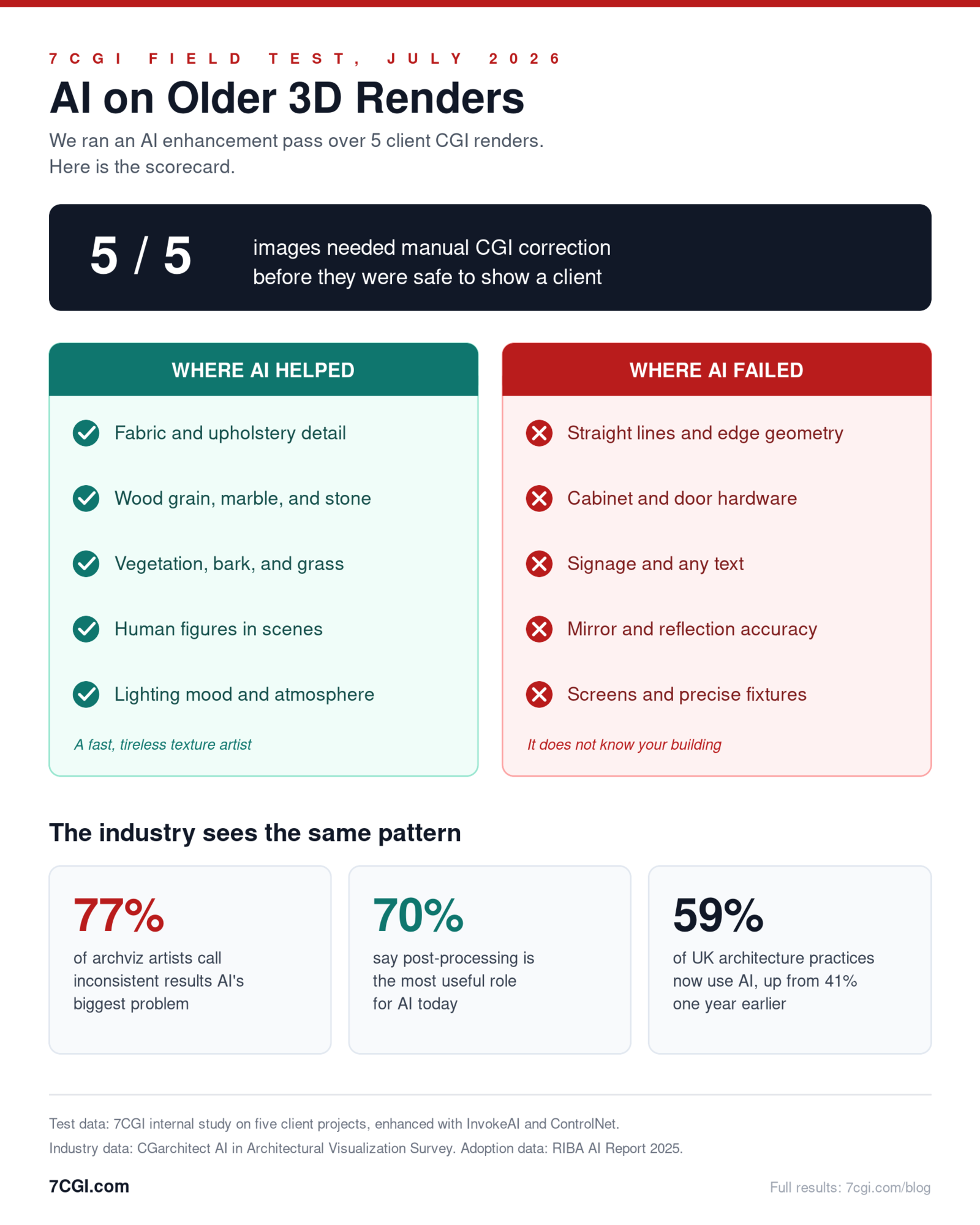
We pulled five older CGI renders from real client projects and ran them through an AI enhancement pass. The short version: AI made fabric, wood grain, and vegetation look noticeably more photographic. It also bent straight lines, garbled every piece of signage it touched, and quietly redesigned cabinet hardware nobody asked it to change. Not one of the five images was safe to hand to a client without manual correction.
For brands with older renders · Tested by 7CGI
Why We Ran AI Enhancement on Our Older Renders
We pulled five older CGI renders from real client projects and ran them through an AI enhancement pass. The short version: AI made fabric, wood grain, and vegetation look noticeably more photographic. It also bent straight lines, garbled every piece of signage it touched, and quietly redesigned cabinet hardware nobody asked it to change. Not one of the five images was safe to hand to a client without manual correction.
Plenty has been written about AI and rendering, but most of it is theory. This post is a field report. Every observation below comes from an actual before and after pair, and you can inspect each one yourself.
Clients keep asking us a version of the same question: can AI refresh the renders we already paid for, so we do not have to pay for new ones? It is a fair question, and we wanted a tested answer instead of an opinion.
By “older renders” we mean images that are three to six years old. The geometry in them is still correct, because it came from CAD and Revit files. What ages is everything else: resolution, vegetation libraries, fabric detail, and post-processing style. A 2020 render often looks like a 2020 render, even when the design has not changed.
One thing this post is not: a general comparison of the two workflows. We already covered that ground in our AI vs 3D rendering comparison. This post looks specifically at the refresh use case: taking existing CGI images and running them through current image-to-image enhancement models.
How We Set Up the Test
We kept the AI render enhancement setup simple and repeatable, because a test you cannot repeat is just an anecdote.
The AI workflow we used
We ran each render through an img2img enhancement pass in InvokeAI, with ControlNet Canny edge guidance to hold the structural lines. Prompts were targeted rather than transformative: enhance textures, clean up lighting, modernise materials, add realistic vegetation, add believable entourage. Denoising strength stayed between 0.35 and 0.55. Any higher and the model began rebuilding the architecture; any lower and it barely touched the image.
The five renders we picked
We deliberately picked five images that stress different architectural visualization scenarios:
- A hospital corridor with medical equipment, sterile surfaces, and regulatory signage
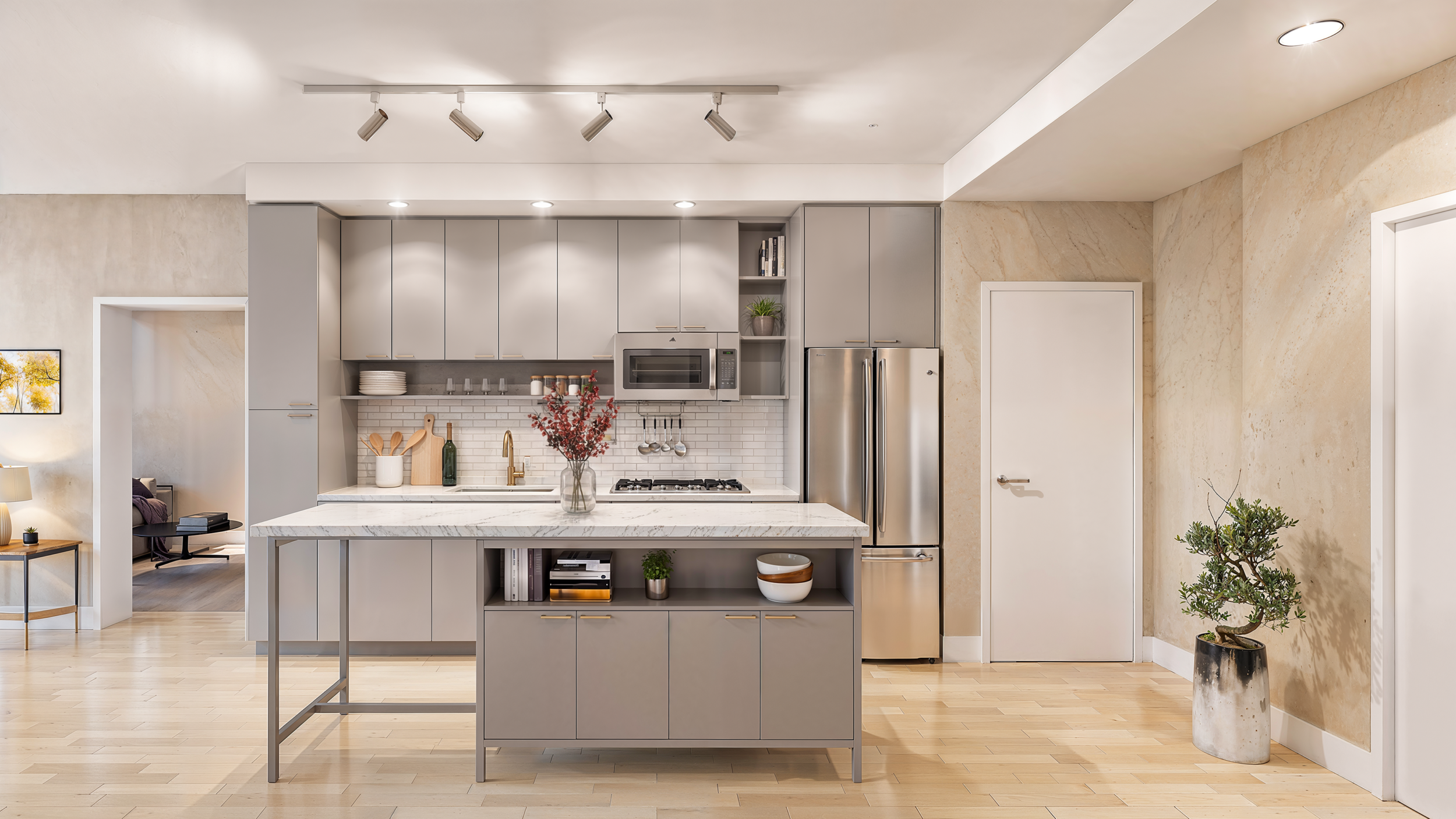
- A multi-family residential kitchen (Florida Avenue, Unit A12) with cabinetry, stone counters, appliances, and daylighting
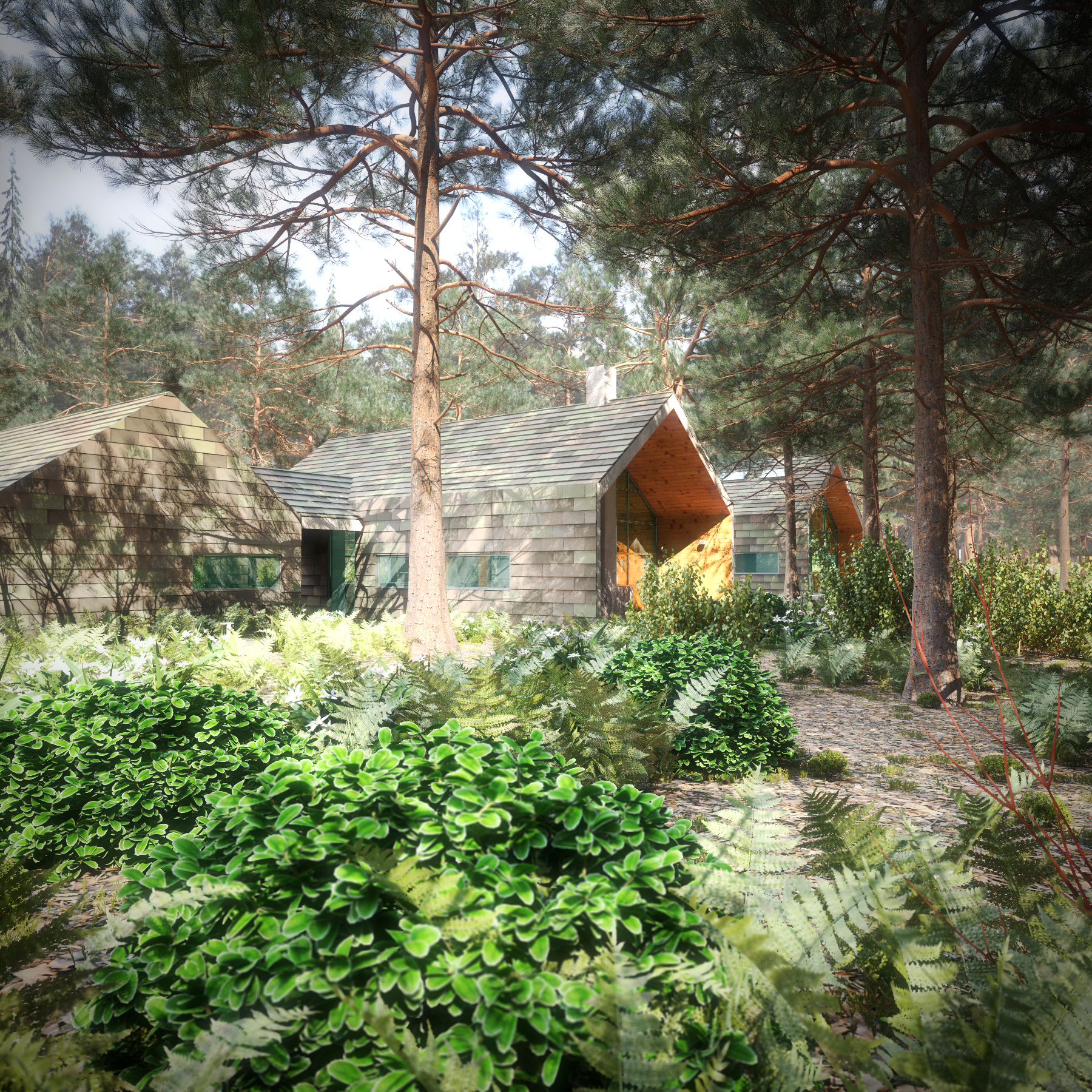
- A modern residential exterior entry court (Stadler View 05) with stone walls, cobblestone paving, and dense foreground landscaping
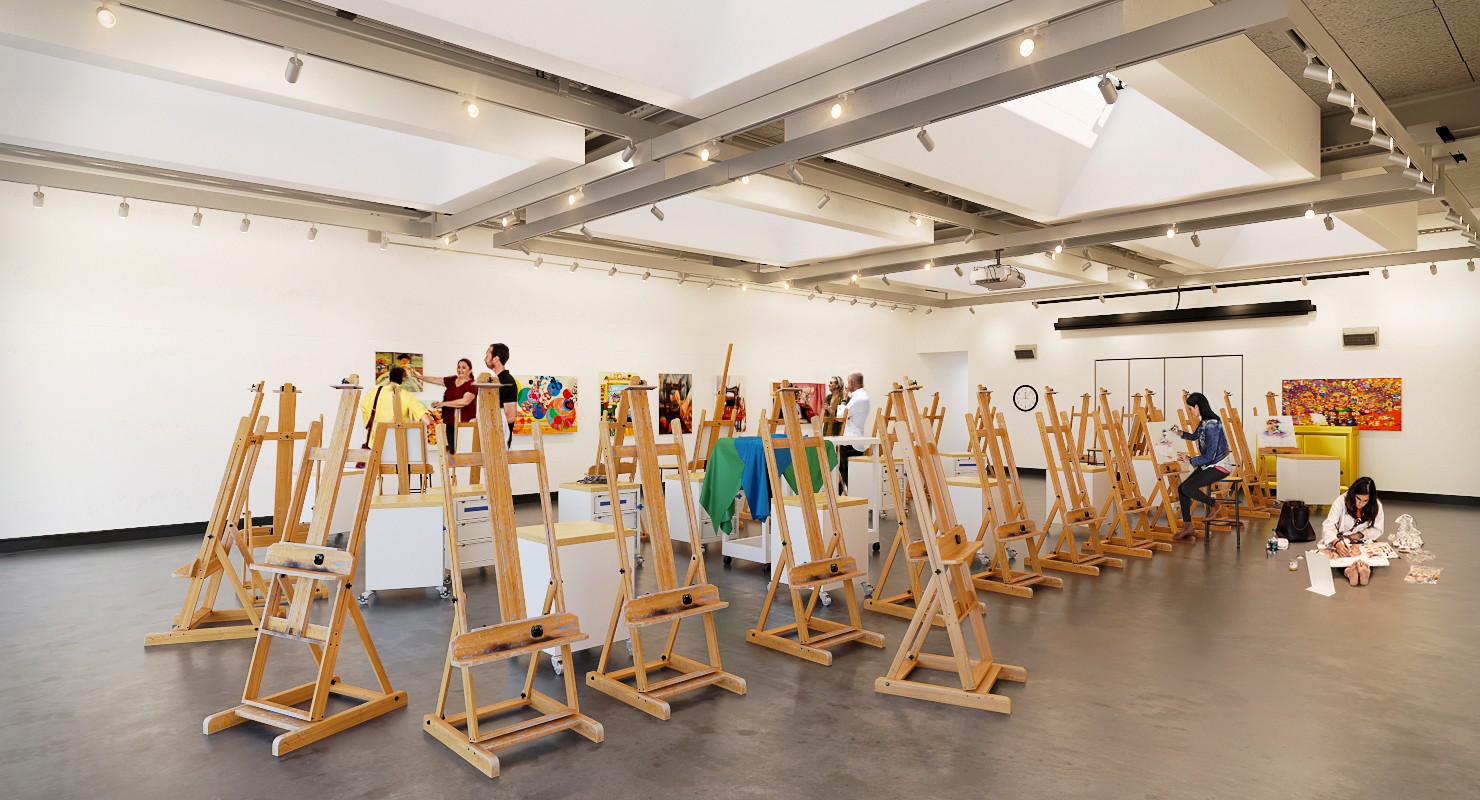
- A performing arts studio space (Kennedy Center) with exposed timber structure, specialist lighting, and gallery walls
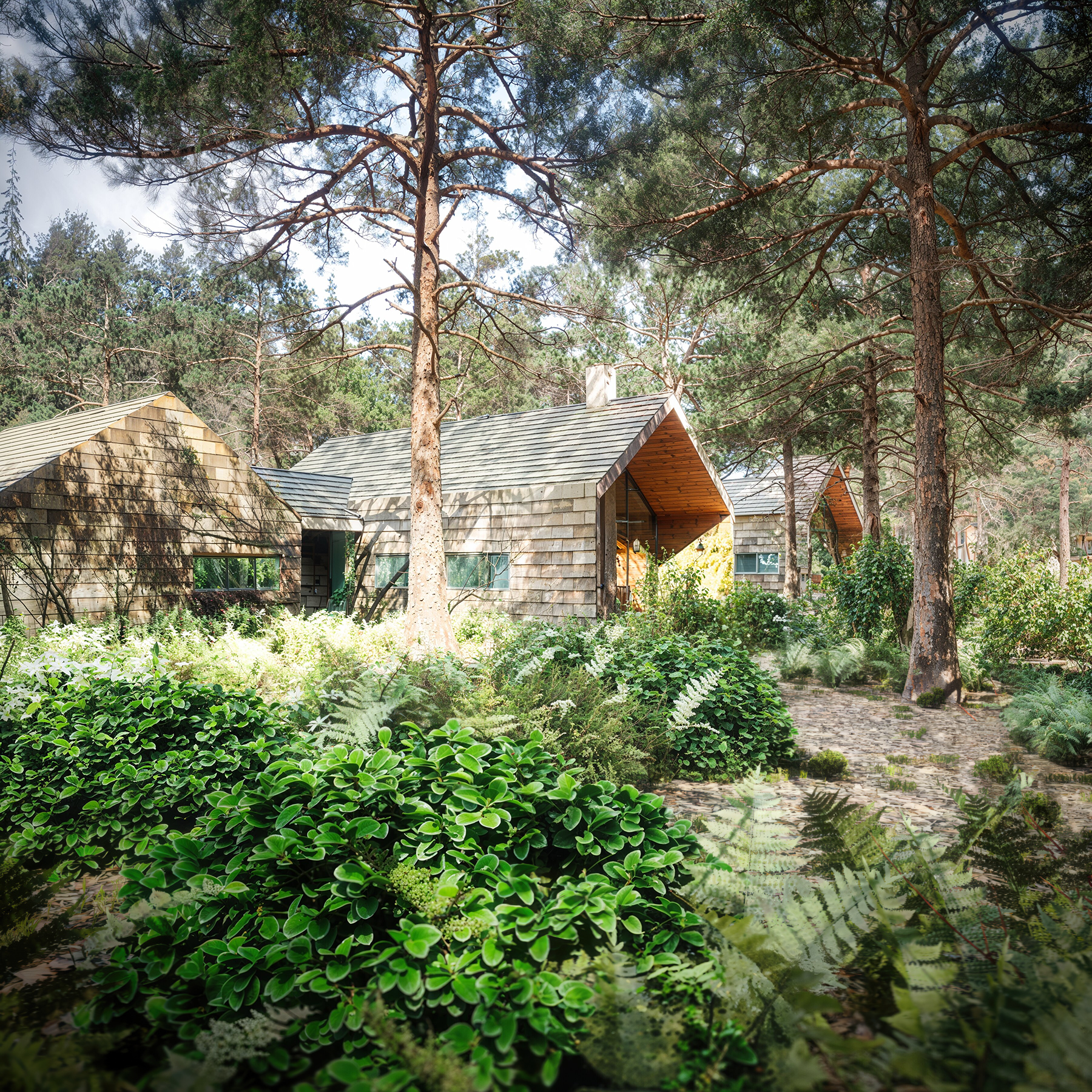
- A residential woodland skyline view (Stadler View 03) with complex forest canopy, shingle siding, and distant horizon lighting
Between them, they cover most of what a working studio renders in a normal production year.
How we judged the results
Our pass or fail standard was strict but practical: could a client approve this image without spotting an unintended change? If a cabinet pull moved, a siding profile shifted, or a sign became gibberish, that was a failure—even if the overall image looked more photographic. In architectural visualization, plausibility is not accuracy.
The Results: Five Before & After Comparisons
Use the side tabs (or click the image) to toggle between the original CGI output and the AI-enhanced result. Notice where the model adds convincing richness, and where it silently dismantles architectural accuracy.
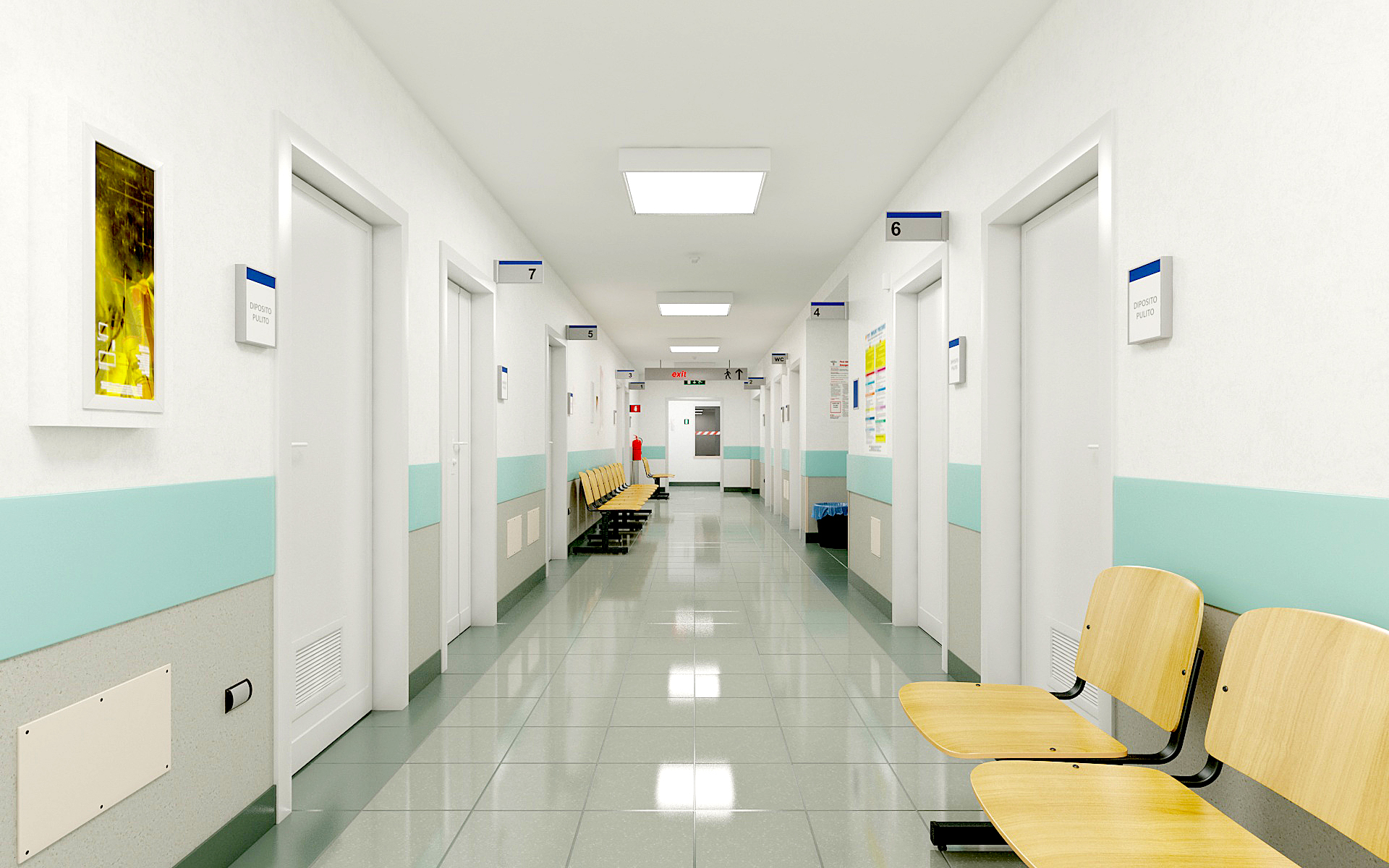
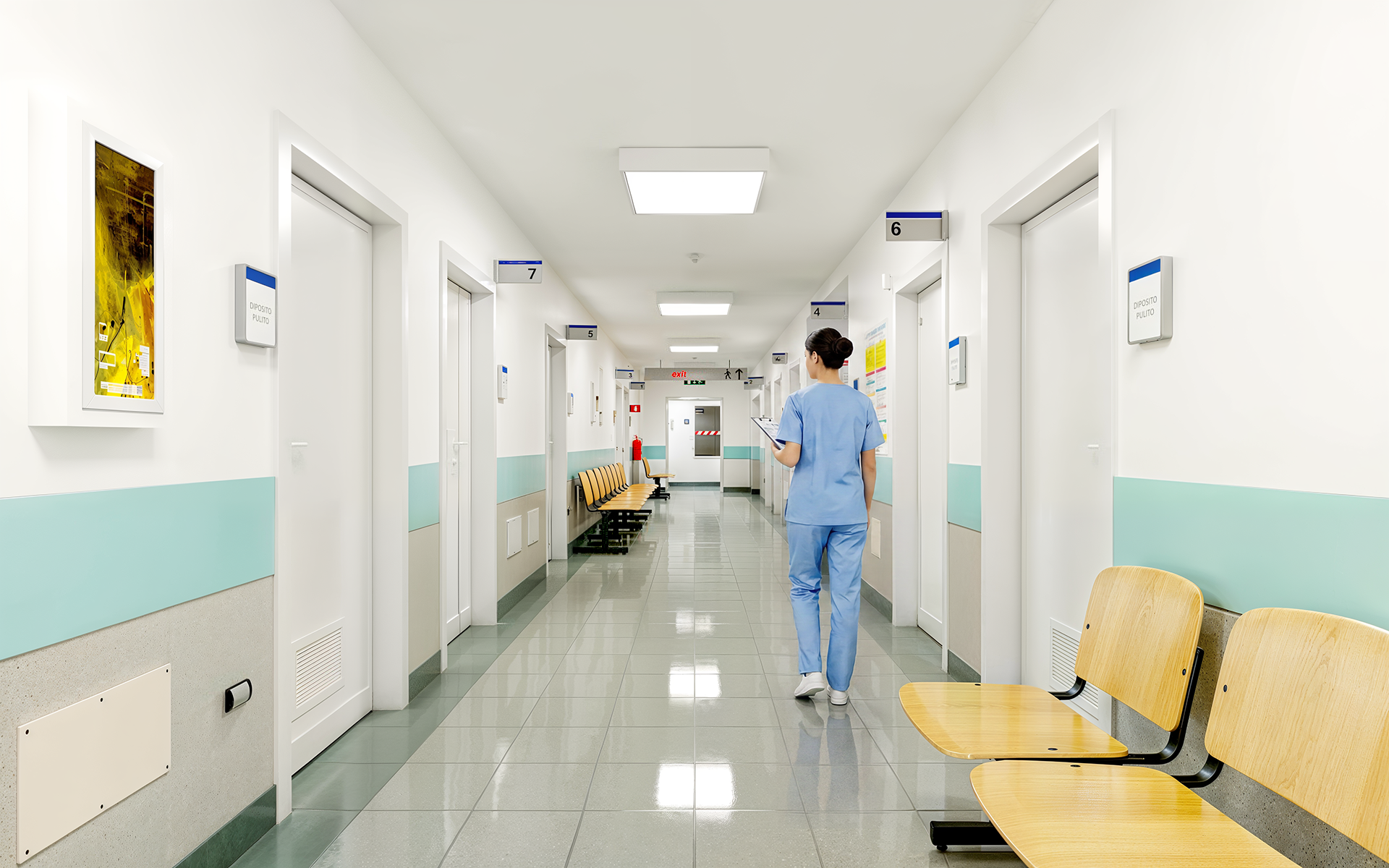
1. Hospital Corridor
Tested: AI staging (nurse insertion) plus brightness and mood improvement.
What Worked
- Figure’s lighting matches the ambient illumination naturally, and the pose feels believable
- Adds immediate scale reference and life to a previously sterile institutional scene
- Floor reflections and overhead troffer bloom gained subtle photographic realism
What Failed / Needs Manual Fix
- Every piece of text in the frame morphed or degraded: signage, door numbers, notice boards
- Ceiling grid reveals softened and lost crisp mathematical perspective
- Handrail brackets along the right wall drifted into irregular shapes
Technical Takeaway
Strong use case for dropping entourage figures into empty corridors, but AI edits the set without asking. Must composite figure with an inverted mask to protect all surrounding architecture.
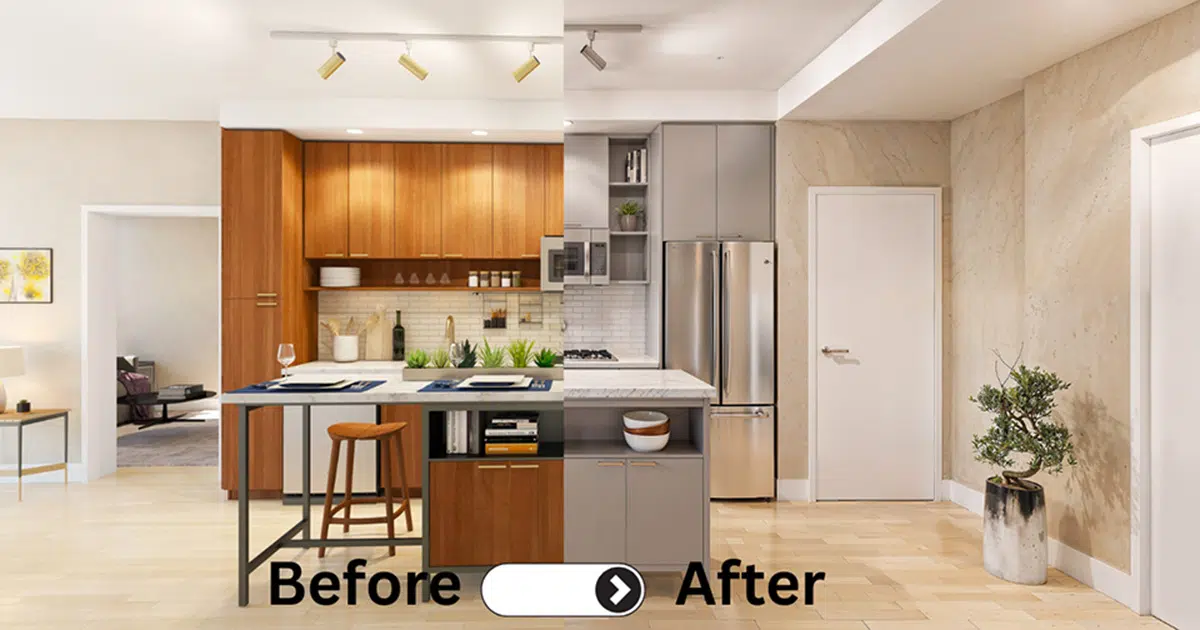
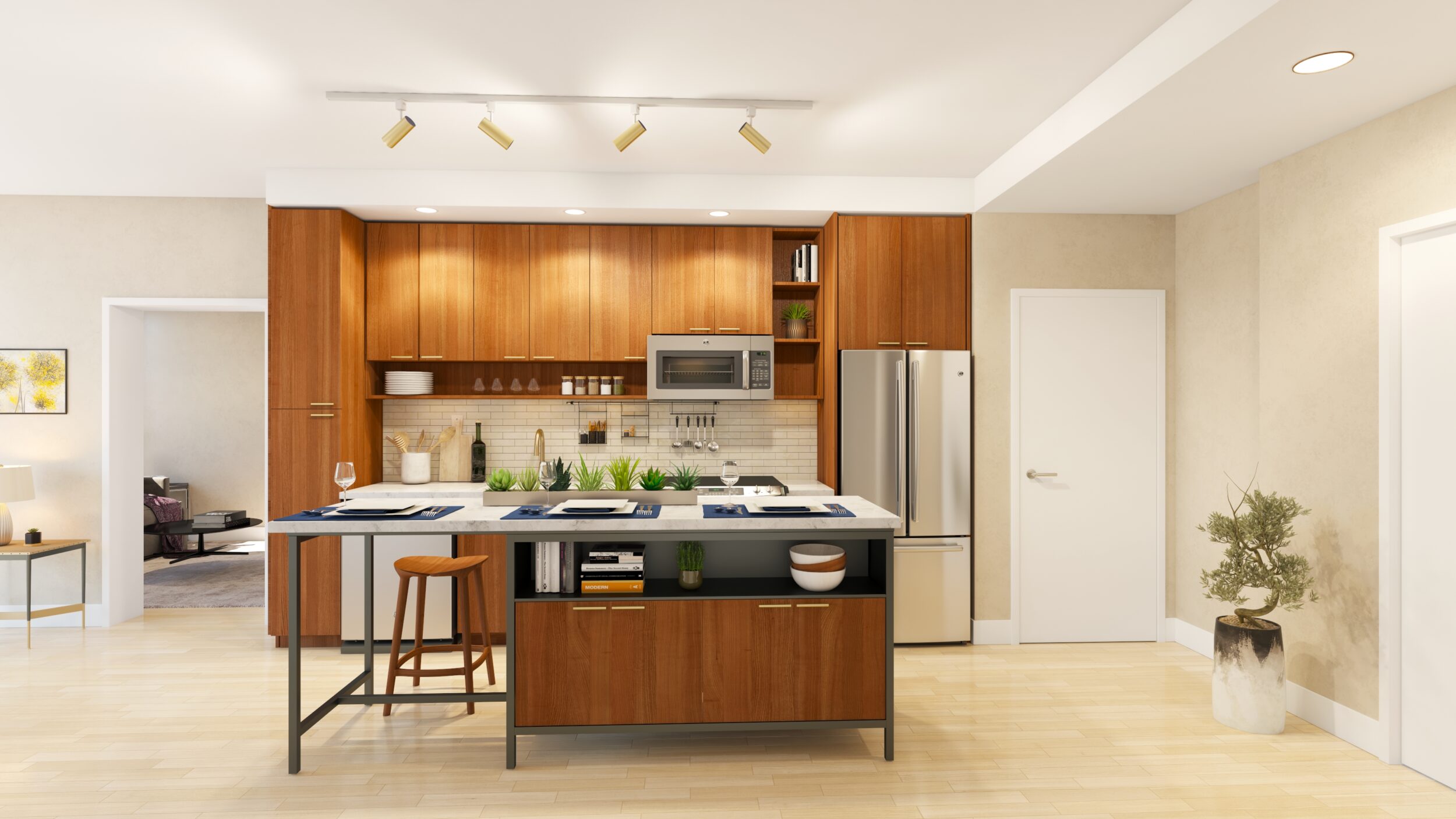
2. Florida Avenue Kitchen (Unit A12)
Tested: An intentional restyle: cabinet color swap to grey, relighting, decluttering, detail enhancement.
What Worked
- Camera, room layout, and cabinet reveal alignments held with no warped geometry
- The wood to grey cabinet color swap asked for in the prompt landed cleanly across all fronts
- Island stone gained believable matte surface reflections and realistic edge bevels
What Failed / Needs Manual Fix
- The exact specified grey tone would not match without manual post-grade
- Pendant light cords above island were slightly blurred and lost wire tension
- Cabinet pull hardware changed profiles between upper and lower sets
Technical Takeaway
The intentional edits (grey fronts, decluttering, floor update) landed with only minor manual touchup needed. The cleanest result of the five tests because the geometry was simple and planar.
3. Stadler Exterior — View 05 Entry Court
Tested: Rescue pass on a dated problem render: vignette removal, oversaturation fix, billboard plant replacement, upscaling.
What Worked
- Heavy artificial vignette and neon greens eliminated; balanced exposure with natural sky
- Cobblestone path completely transformed from flat texture to tangible, varied pavers
- Distant trees and background foliage gained organic branch distribution and realism
What Failed / Needs Manual Fix
- Billboard fern transparency ghosting was graded over rather than repaired
- Specified James Hardie variegated shingle wall became generic stone on the entrance volume
- Entry door frame and handle details lost their architectural specification
Technical Takeaway
Pushed to enhance high-frequency detail (leaves, stone, paving), AI sacrifices precise cladding and material definitions. Organic ground and plants are keepers; the building itself must be masked back in.
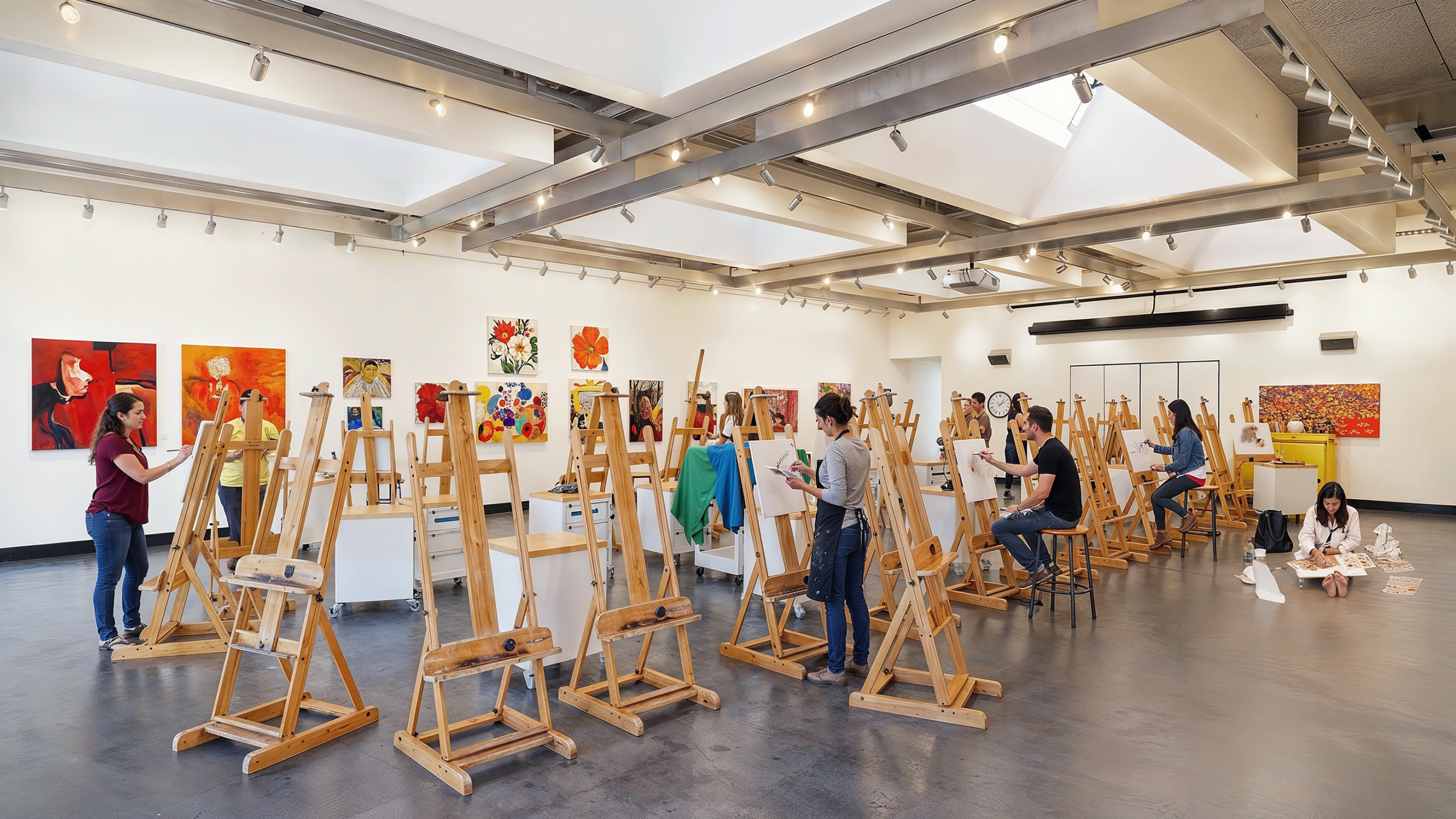
4. Kennedy Center Art Studio
Tested: Entourage generation, wall art fill, camera reframing, upscaling, contrast grading.
What Worked
- The yellow ambient color cast over the original 3D frame was completely neutralized
- Art students and easel setups integrated with believable ground contact and shadows
- Douglas Fir timber surfaces gained tactile end-grain and authentic saw-mark texture
What Failed / Needs Manual Fix
- Original wall artwork replaced with invented paintings (an abstract became a red face)
- Exposed ceiling timber joists began intersecting and bending in perspective
- Track lighting heads lost their fixture hardware geometry
Technical Takeaway
Biggest time saver (entourage generation) and biggest failure (intersecting structural timbers) in one image. The figures can be harvested; the timber structure must stay original CGI.
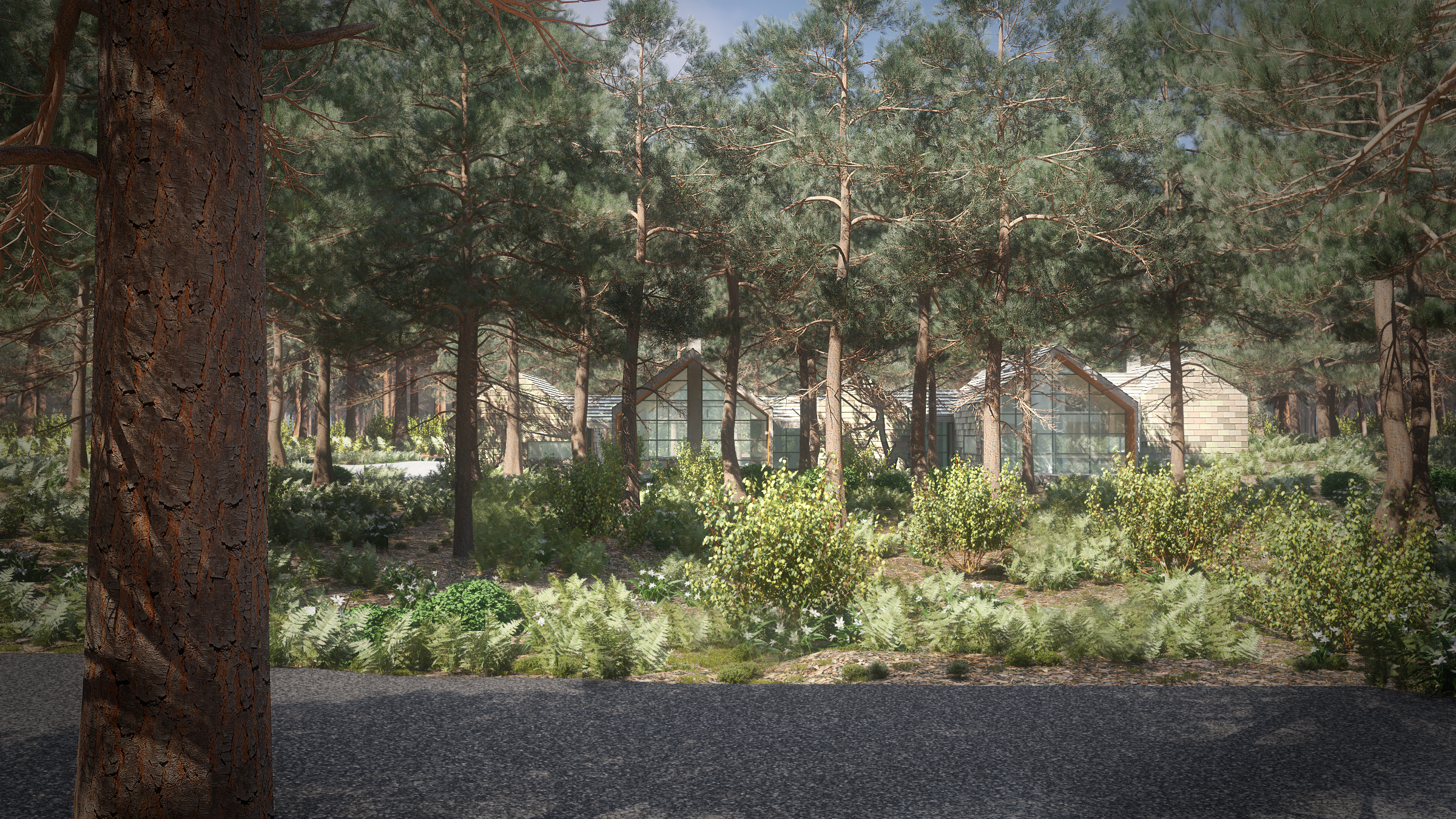
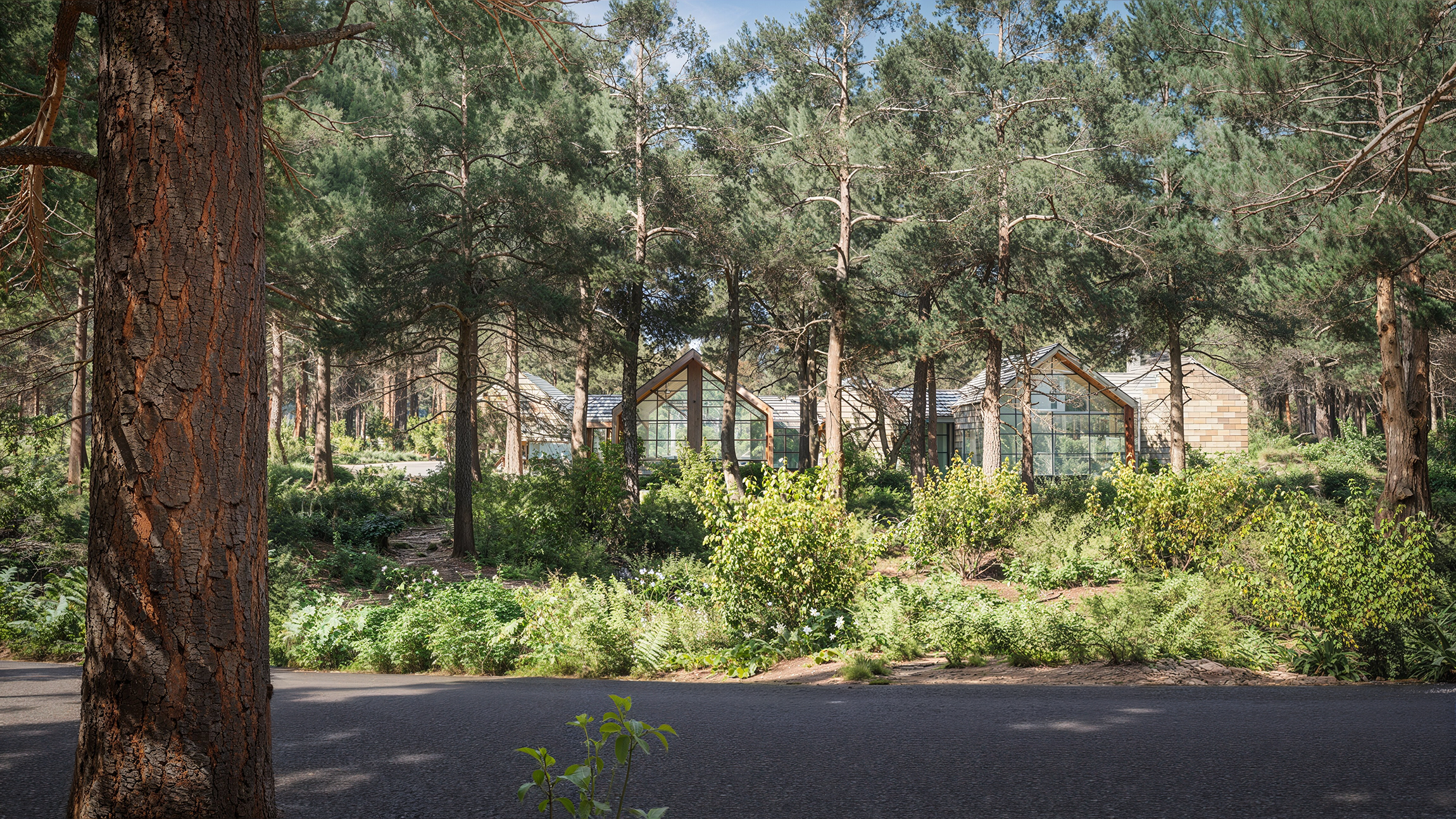
5. Stadler Exterior — View 03 Skyline
Tested: Relighting, atmospheric clearing, vegetation and texture enhancement across a wide woodland vista.
What Worked
- Biggest visual leap of the entire set: sky, canopy light, and horizon ground read as genuine photo
- Foreground tree bark gained convincing lichen, depth, and micro-shadowing
- Roof shingles gained natural atmospheric weathering that eliminated the 3D CG sheen
What Failed / Needs Manual Fix
- Severe facade drift: the right gable turned to brick and stone (it was shingle and glass)
- Window mullion grids changed density, and several clerestory panes were erased
- Architectural roofline overhangs wavered against the sky background
Technical Takeaway
AI treats architecture as negotiable decoration. Render a Material or Object ID pass from the 3D scene to lock the building, then let AI rebuild the landscape and atmospheric volume around it.
What AI Did Well & Where It Failed Every Time
What AI Did Well in Every Test
AI earned its keep on organic material, atmosphere, and people. Those three strengths repeated across all five images without exception:
- Organic textures: Fabric, wood grain, marble, bark, and grass all came back richer, more tactile, and less synthetic. The flat CG feel that dates older renders mostly vanished.
- Atmosphere and lighting: Haze, lens bloom, bounce light, and sky transitions gained depth. The scenes felt like photographs captured through real glass lenses rather than mathematically perfect frame buffers.
- Entourage insertion: Dropping believable figures into spaces was dramatically faster than sourcing, silhouetting, and color-matching 2D stock photos. The illumination match was immediate.
If your old render’s sole problem is that it feels sterile, stiff, or visually dated, an AI pass addresses exactly those shortcomings.
Where AI Failed Every Single Time
Every failure traced back to one root cause: the model does not know your building. Four failure types repeated across every test without fail:
- Geometry drift: Siding profiles, window mullions, cabinetry reveals, and wall seams all shifted. Small shifts, but immediate disqualifiers for anyone who knows the architectural design.
- Hardware redesign: Handles, faucets, light fixtures, and hinges were quietly substituted with generic alternatives that the model felt belonged there.
- Signage and text corruption: Room numbers, exit signs, framed prints, and book titles all dissolved into unreadable, alien glyphs.
- Perspective line warping: Long, straight architectural lines—corridors, ceiling grids, facade edges—gained subtle wobbles that look like lens distortion or sloppy modelling.
Why this happens
An image model predicts plausible pixels based on statistical patterns learned from millions of pictures. It has no 3D understanding, no coordinate system, and no concept that a straight line in perspective must remain mathematically straight. ControlNet helps by constraining edges, but inside those edges, the model still hallucinates what it thinks is typical. In professional architecture and industrial design, typical is rarely what the client specified.
What the Wider Industry Is Finding
Our results line up closely with what the broader visualization and architecture community reports, which is worth knowing before you build an agency or marketing strategy around AI upscaling.
In the CGarchitect AI survey of architectural visualization professionals, about 73 percent had already tested generative AI in their pipelines. The single biggest barrier cited across the industry was lack of control over precise design details—the exact issue our five tests documented.
Adoption keeps climbing anyway. The RIBA AI Report 2025 found that 59 percent of UK architecture practices now use AI tools on projects, up from 41 percent in 2024. But the usage is overwhelmingly concentrated in early ideation and post-production polish—almost nobody is using pure AI generation for construction-critical or contract-binding client deliverables.
What Still Needs CGI & The Hybrid Workflow
Anything that gets approved, purchased, or built still needs an accurate 3D scene behind it. Based on our five tests, we would never use unassisted AI for:
- Approval images: If a client signs off against drawings or an FF&E schedule, the image must match the spec down to the millimetre.
- Regulated environments: Healthcare, education, and commercial spaces with code-driven requirements cannot tolerate hallucinated signage or altered door hardware.
- Specific products and finishes: If the specification calls for Caesarstone 5143 or a Knoll Saarinen chair, an AI model that approximates them with generic stone and mid-century chairs is a liability.
The Hybrid Workflow We Use Now
The test did not make us anti-AI. It gave us a rulebook. Here is the production workflow we settled on after reviewing all five comparisons:
-
Render the base image from the accurate 3D scene
Geometry, cameras, lighting setup, and materials remain 100% authoritative in CAD/3ds Max/Blender.
-
Render Object ID and Cryptomatte masks
Generate precise selection masks for structure, hardware, cabinetry, and critical architectural boundary lines.
-
Run an AI enhancement pass targeting ONLY organic layers
Let the model generate vegetation, soft furnishings, sky atmosphere, surface micro-weathering, and human entourage.
-
Composite the AI pass back over the accurate CGI base in Photoshop
Use the masks from step two to protect all hard surfaces, joinery, and building lines from geometric drift.
What most teams miss is step two. Without masks, you are trusting a pattern generator with your client’s architecture. With masks, you get the photographic richness of AI and the contract accuracy of CGI.
Should You Enhance an Old Render or Re-render It?
Use this rule of thumb from our test results to decide whether your archive images are candidates for an AI-assisted refresh or need a ground-up re-render.
Enhancement with AI assist makes sense when:
- The design has not changed and the underlying geometry is still accurate
- The image is intended for marketing freshness, social media, or portfolio presentation rather than construction approval
- The primary weakness of the original render is dated vegetation, sterile lighting, or lack of entourage
Re-rendering from the 3D scene makes sense when:
- The design, materials, or FF&E specifications have been updated
- You need new camera angles, animations, interactive 3D, or a cohesive suite of images
- The project requires signed client approval or contractual specification fidelity
Budget is usually the deciding factor, and the honest answer is that enhancement is cheaper per image, but only if you factor in the manual correction pass. An uncorrected AI render is never a bargain if it misrepresents what gets built.
Frequently Asked Questions
Can AI improve old 3D renders?
Yes, within limits. In our five image test, AI reliably improved fabric, wood, stone, vegetation, people, and overall atmosphere. It also introduced geometry and text errors in every image, so the output needed manual correction before client use.
Does AI change the geometry of a render?
In our experience, always at least a little. Siding profiles, window mullions, cabinet hardware, and wall seams shifted in our tests even with edge guidance enabled. The changes are small but visible to anyone who knows the design.
Which AI tools can enhance a 3D render?
We used InvokeAI with ControlNet for this test because it runs locally and is repeatable. Tools like Magnific, Krea, and Gemini based image editors do similar enhancement work. Every tool in this category shares the same core limitation: it predicts pixels without knowing your actual scene.
Is an AI enhanced render safe to show clients?
Only after review and correction. Treat the AI output as a draft, check it against the original geometry and spec, and replace anything structural that drifted. Unreviewed AI output is a risk to client trust, especially in architecture and product work.
Is it cheaper to enhance an old render with AI than to re-render?
Per image, usually yes, since the 3D scene does not need to be reopened. But correction time adds up, and a render that misrepresents the design can cost far more than it saved. Scope it case by case.
Should we upload confidential renders to online AI tools?
Be careful. Many web based tools process images on external servers, which can conflict with NDA obligations. This is one reason we ran this test on a locally hosted pipeline instead of a browser upscaler.
The Bottom Line
AI passed the texture test and failed the trust test. It is a strong finishing assistant for organic detail, people, and atmosphere. But without an accurate 3D scene and strict compositing masks, it cannot be trusted with the architecture.
CGI still owns the ground truth of design.
Assess Your Archive with 7CGI
If you have an older render library and are not sure which images can be refreshed with our hybrid workflow and which need a fresh 3D build, send a few our way. We’ll give you a frank assessment.
Discuss Your Project